Content Modeling in a Headless CMS vs. Traditional Web CMS
Learn how to model content for Headless CMS

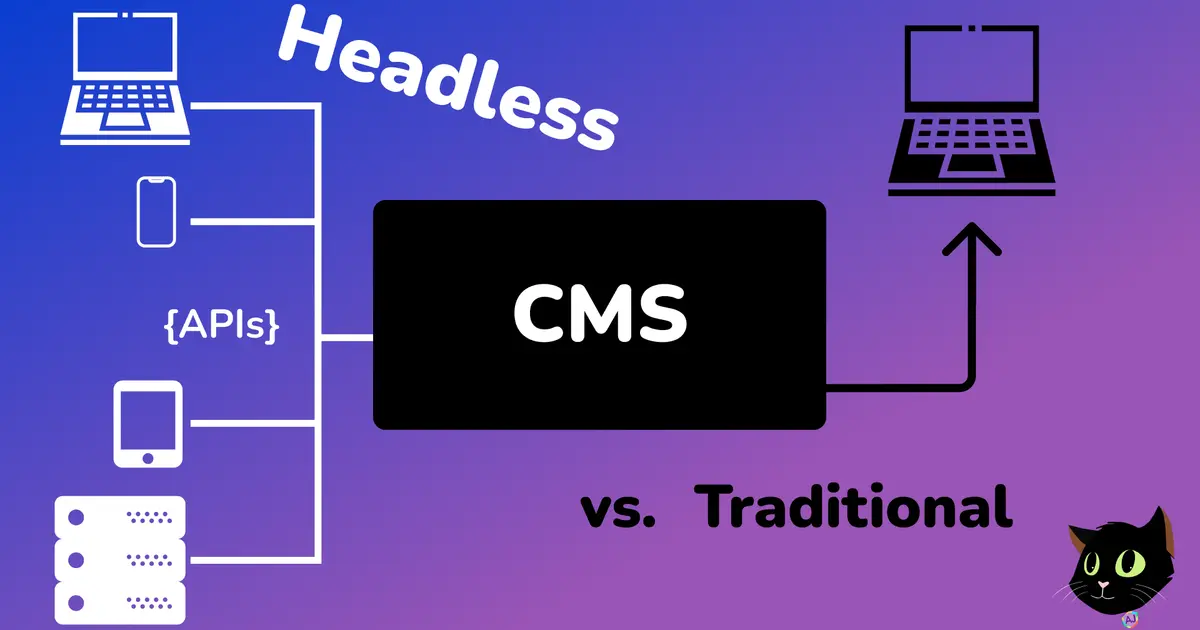
Before we get into the details of how page modeling differs between a Headless CMS and a Traditional CMS we must first understand what each of those architectures entail.
Like many of you, my first experience with a content management system (CMS) was with WordPress many years ago. WordPress was a great solution for presenting data on a single platform for the web. It was easy to use and customize, and it had a wide range of features that made it ideal for a variety of purposes.
WordPress is still used in several applications today, but the landscape has changed as we have moved to a multi-device world-spanning web. Now we must also have solutions for web, mobile, tablets, smartwatches, digital assistants, IoT, voice, VR/AR, the list continues. Along with this demand for multiple devices, users expect a more personalized digital experience across all of these devices. In today's world, efficiency requires flexibility. A headless CMS can help you achieve this.
Traditional CMS Architecture
In a traditional CMS, the front and back ends are like two cats in a trench coat trying to pass as one human. They're both working towards the same goal, but they're constantly tripping over each other and getting in each other's way. The marketers and content editors are in the front end, trying to create a beautiful and engaging website for the users. The developers are in the back end, trying to keep the website running smoothly and securely. But because they're all sharing the same space, it's a constant battle of who can get their work done first. It's a mess, but somehow it worked in the past.
The Content Management Application (CMA) is like a cat's brain. It's where all the thinking and decision-making happens. It includes the back-end to administer the site and manage content.
The Content Delivery Application (CDA) is like a cat's body. It's what allows the CMA to interact with the world. This is where a frontend developer will spend most of their time making sure that the content is correctly formatted and looking good for presentation.
A Traditional CMS is like a Siamese cat. It's two cats in one, and they're always getting into trouble. The CMA and CDA are built together, so all programming, content and formatting are in a single system.
In the below illustration you can see how the different parts come together within a single server.
Headless CMS Architecture
A headless CMS is a content management system that does not have a built-in front end. Instead, it provides a back end for storing and managing content, and an API for delivering that content to any front end that you choose. This gives you the flexibility to create websites and apps that look and feel the way you want, without being limited by the capabilities of the CMS's front end.
As a frontend developer you know the landscape moves very fast and with meta-frameworks like Astro, Next.js, Nuxt, and SvelteKit adding features at a lightning pace, it is hard to keep a Traditional CMS updated with these changes.
<aside class="flex flex-col items-start gap-2 alert variant-ghost"> <div class="text-2xl">Headless CMS Architecture</div> <ul> <li>A content management backend (often including text and media) <li>API/Web services support <li>Microservice Architecture </ul> </aside>
A headless CMS is like a cat with two heads. One head is the back end, where all the content is stored and managed. The other head is the front end, where the content is displayed. This allows the content to be separated from the programming and formatting, which makes it easier to manage and update.
A headless API-first CMS is like a cat that can walk on water. It can deliver content to any device via APIs, which means that you can create websites, apps, and even smartwatch apps all from the same content. This is a great way to reach a wider audience and make your content more accessible.
A headless CMS frees developers to use any framework they want. This is because the CMS does not have a built-in front end, so developers can create their own front end that looks and feels the way they want. This gives developers more flexibility and control over their projects.
In the below illustration you can see three important differences from the Traditional CMS, the frontend template is removed, you no longer need to host your own server, and all devices are able to communicate via APIs to the CMS.
Content Modeling
There are common requirements when you look at content modeling for pages in your web application between a traditional and headless CMS. You must first breakdown the end user experience of each page into different content types and properties. Amplience has an amazing guide on <a target="_blank" rel="noopener noreferrer" href="https://amplience.com/developers/docs/concepts/content-modeling/">the process of content modeling.</a>
This guide consists of the 4 steps below:
- Requirements and Wireframes
- Break it down into modules
- Design content types
- Evaluate and iterate
Content Modeling in a Traditional CMS
- Identify the different types of content that will be on the page. This could include text, images, videos, and other multimedia.
- Create a content model for each type of content. The content model should define the properties of the content, such as the title, description, and format.
- Create a page template that will be used to display the content. The page template should define the layout of the page, such as the header, footer, and sidebar.
- Assign the content models to the page template. This will tell the CMS how to display the content on the page.
One of the biggest differences is the page template step. In a headless CMS you need to model the data and properties and not think about the page.
Content Modeling in a Headless CMS
There are a few different approaches to content modeling in a headless CMS. One approach is to create a single page model that represents all of the pages in your website or app. This approach is simple and easy to implement, but it can be limiting if you need to create a large number of pages or if you need to create pages with different layouts.
Another approach is to create a separate page model for each page in your website or app. This approach gives you more flexibility, but it can be more complex to implement.
The best approach for content modeling in a headless CMS will depend on the specific needs of your website or app. However, it is important to choose an approach that will make it easy to create and manage your content.
One thing that I CANNOT stress enough is that you are modeling content and data not just for the developers on the other side of the API, but also for authors creating that content. So you need to make sure that both sides can easily understand that data that they are dealing with correctly and how it will impact all of the different devices that the data con be created on.
Content Types are an important part of this! Below you can see an example of a Blog object, it not only specifies all the correct properties, but the validation that is required for instance in maxLength.
When you start to think about this type of modeling start to think of these as blocks building up a page for a website, and also think of it as a single small frame on a watch. This should help you start with the content that is needed and allow another frontend developer to create whatever style of application they want with the same schema.
